Key points
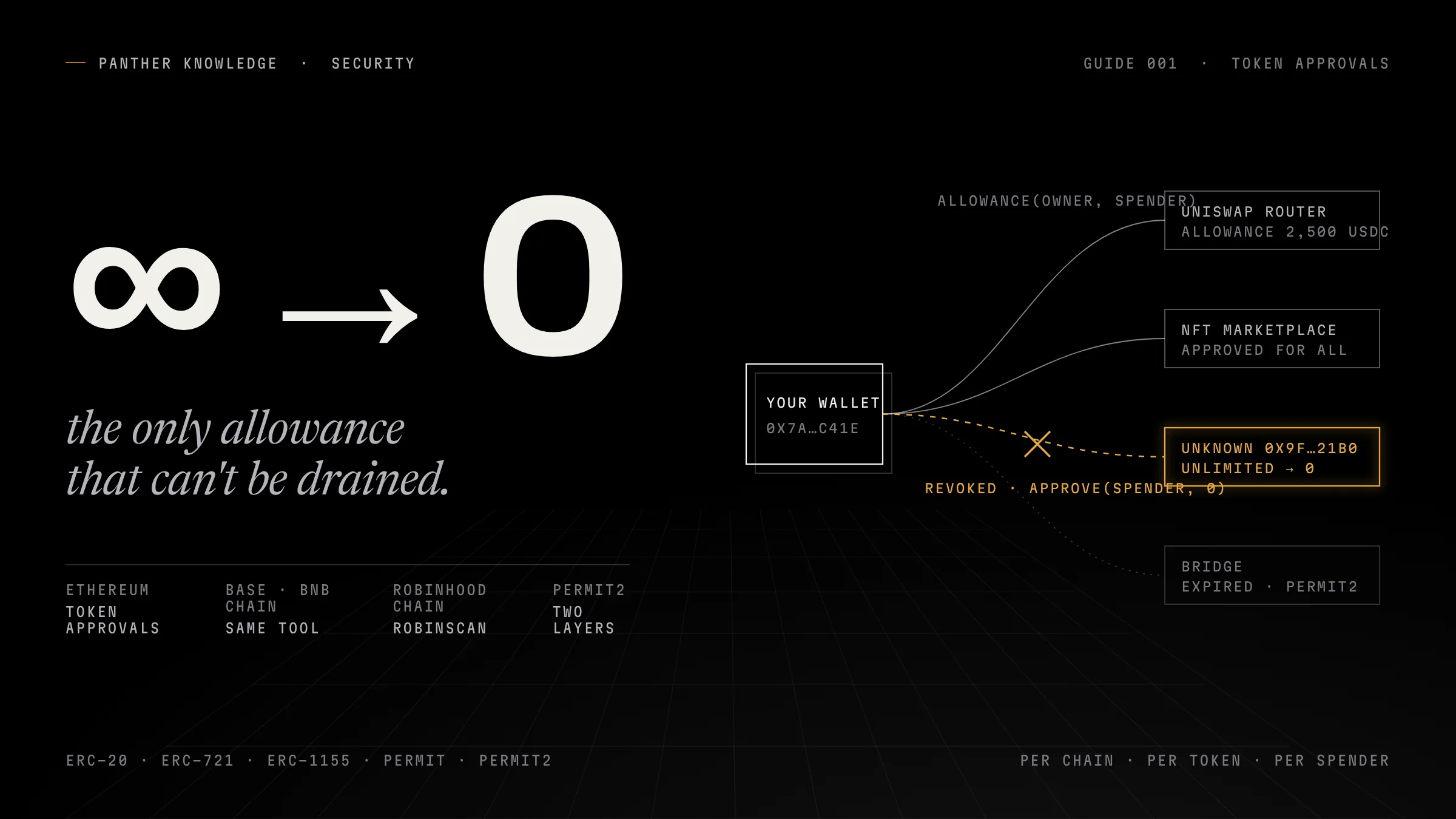
- An approval is an allowance recorded inside the token contract. transferFrom lets the spender move your tokens at any time until the allowance is set to 0.
- Approvals are per chain, per token, per spender. Revoking on Ethereum changes nothing on Base, BNB Chain or Robinhood Chain.
- Signatures (Permit, Permit2) create approvals with no transaction in your history. In 2024, 56.7% of the largest wallet-drainer thefts were Permit signatures.
- Permit2 has two layers: the token's approval to Permit2, and Permit2's allowance to the app. Revoke the app allowance; clear both for a clean slate.
- Revoking is a normal transaction and costs gas. It cannot recover tokens that already left.
- If a drainer approval is live and you still hold the tokens, move them to a fresh wallet first, then revoke.
Every time you use a decentralized exchange, a bridge, an NFT marketplace or a launchpad, you sign something that lets a smart contract move tokens out of your wallet. Most of those permissions never expire. They sit there for years, and the day the contract behind one of them is compromised, or the day you approve a fake site by mistake, the tokens leave without any further click from you.
This guide shows you how to see every live permission on your wallet, how to cancel the ones you no longer need, and what a cancellation can and cannot do. It covers Ethereum, Base, BNB Chain and Robinhood Chain, and the method at the end works on any EVM network with a block explorer.
What a token approval actually is
Tokens on EVM chains are not held “in” your wallet. Your balance is a number inside the token’s own contract, and that contract decides who may move it. The ERC-20 standard defines two functions for delegating that right:
approve(spender, amount)records thatspendermay withdraw up toamountof your tokens. The standard is explicit that calling it again “overwrites the current allowance” with the new value.transferFrom(from, to, amount)is what the spender calls later to actually move the tokens. It only succeeds if an allowance exists.
The current allowance is public. Anyone can read allowance(owner, spender) on the token contract, which is exactly what approval checkers do.
Three details matter in practice:
Unlimited approvals. Many apps ask for the maximum possible number (2²⁵⁶ − 1) so you never have to approve again. Convenient, and it means a compromised spender can take your entire balance, including tokens you receive after the approval was granted.
NFTs have two kinds. ERC-721 has approve(address, tokenId), which covers one NFT and is reset automatically when that NFT is transferred, and setApprovalForAll(operator, true), which lets an operator manage every NFT you own in that collection until you turn it off. Marketplaces almost always use the second one. ERC-1155 only has setApprovalForAll.
Signatures can create approvals without a transaction. EIP-2612 “permit” tokens, and Uniswap’s Permit2 system, let you sign a message off-chain that someone else later submits to set an allowance. You pay no gas, and you see no “approve” transaction in your wallet history. This is why signature phishing is now the dominant drainer technique: of the thirty largest wallet-drainer thefts of 2024 tracked by Scam Sniffer (over $1 million each, $171 million combined), 56.7% were Permit signatures. Across all drainer attacks that year, 332,000 addresses lost about $494 million.
Permit2 is two layers, not one
Permit2 deserves its own paragraph because revoking it half-way is a common mistake.
Uniswap deploys Permit2 at the same address on every chain it supports: 0x000000000022D473030F116dDEE9F6B43aC78BA3 on Ethereum, Base, BNB Chain and Robinhood Chain (the Robinhood Chain deployment is verified on the chain’s Blockscout explorer). The flow has two steps:
- You approve the Permit2 contract on the token itself, usually for an unlimited amount.
- Inside Permit2, you grant an allowance to the actual app (a router, for example) with an amount and an expiration. Permit2 allowances are capped at a
uint160maximum, which it treats as unlimited, and the expiry is a timestamp; passing0expires the permission immediately.
Revoking the app’s allowance inside Permit2 (the contract’s lockdown function does this for a list of token-and-spender pairs, and setting the amount to zero does the same) stops that app. The token-level approval to Permit2 itself stays, which is normally fine, because Permit2 only moves tokens on the instructions of an allowance you granted. If you want a clean slate, revoke both.
Approvals are per chain, per token, per spender
An allowance lives inside one token contract on one network. Revoking USDC-to-Uniswap on Ethereum does nothing to USDC-to-Uniswap on Base, even though Permit2 and the router sit at similar addresses. You have to check, and pay a small amount of gas, on each chain separately.
| Network | Chain ID | Gas paid in | Explorer | Built-in approval tool |
|---|---|---|---|---|
| Ethereum | 1 | ETH | etherscan.io | Token Approvals (More → Token Approvals) |
| Base | 8453 | ETH | basescan.org | Token Approvals (same tool) |
| BNB Chain | 56 | BNB | bscscan.com | Token Approvals (same tool) |
| Robinhood Chain | 4663 | ETH | robin.etherscan.io (RobinScan, built by Etherscan) and robinhoodchain.blockscout.com | Token Approvals on RobinScan (ERC-20 tab); manual method on either explorer |
Robinhood Chain is an Arbitrum Orbit Layer 2 that settles to Ethereum, launched on mainnet on July 1, 2026, and pays gas in ETH. It has two explorers worth knowing. Blockscout describes itself as the chain’s official explorer and has indexed it from block one. Etherscan’s team also runs RobinScan at robin.etherscan.io, with the same layout as Etherscan and a Token Approvals page under More → Services. At the time of writing, that page shows an ERC-20 tab only, so check NFT approvals with the manual method below. Be careful with look-alikes: other sites use the RobinScan name on different domains and are not run by Etherscan or Robinhood. Type the address yourself rather than following a link.
Step 1: see every approval on your wallet
Etherscan, BaseScan, BscScan, RobinScan. Open the Token Approvals page, paste your address, and switch between the token-standard tabs the explorer offers (ERC-20, ERC-721 and ERC-1155 on Etherscan). Turn on “show all approvals”. The page reports an “at risk” amount: what a hacked spender could take right now. To revoke from the page you connect a wallet; Etherscan’s own disclaimer applies (“provided as is, without guarantees”).
Revoke.cash does the same thing across many networks from one screen. Enter your address, pick the network, and sort newest-first if you suspect a recent phishing approval. Check that your network is in its list; an empty result on a network a tool does not index looks exactly like a clean wallet.
Any EVM chain, no tool. Open the token’s contract on the explorer, go to the Read tab, call allowance with your address and the suspected spender. A non-zero number is a live approval. On Robinhood Chain this works on both RobinScan and Blockscout, under the token contract’s Read tab.
What to look for while you read the list:
- Spenders you do not recognise. Legitimate routers are usually labelled by the explorer; a random unlabelled address with an unlimited USDC allowance is the signature of a drainer.
- Approvals granted at the same minute you signed something on an unfamiliar site.
- Unlimited approvals to apps you used once.
setApprovalForAllto anything that is not the marketplace you actually use.
Step 2: revoke
Revoking is a normal transaction that you send and pay gas for. There is no way around the gas: the allowance is state inside the token contract, and only a transaction changes state. It is one small contract call on that chain; your wallet shows the fee before you confirm, and on Layer 2s like Base and Robinhood Chain it is usually negligible.
What the “Revoke” button actually sends:
| Approval type | Transaction |
|---|---|
| ERC-20 allowance | approve(spender, 0) on the token contract |
| ERC-721 single NFT | approve(0x000…000, tokenId) |
| ERC-721 / ERC-1155 collection | setApprovalForAll(operator, false) |
| Permit2 allowance | approve(token, spender, 0, 0) or lockdown([...]) on the Permit2 contract |
Three things to know before you click:
Order matters if you are being drained right now. A drainer with a live allowance can sweep your tokens the moment they appear. If a malicious approval exists and you still hold the tokens, the fastest protection is usually to move the tokens to a fresh wallet first, then revoke. Both are transactions; the transfer is the one that removes the prize.
Some tokens must go to zero before changing. The ERC-20 specification recommends setting an allowance to 0 before setting a new non-zero value, to avoid a known race condition, and some older tokens enforce it in code. Tether’s USDT on Ethereum is the well-known case: changing a non-zero allowance directly to another non-zero value reverts. Revoke tools already send 0, so this only bites when you try to “reduce” an approval instead of cancelling it.
A revoke on one chain is one chain. Repeat the audit on every network where you have used the same wallet.
The manual method, on any explorer
When no tool covers the network, or you want to see exactly what you are signing, do it from the token contract directly. Works on Etherscan, BaseScan, BscScan, RobinScan and any Blockscout explorer.
- Open the token contract page and confirm the contract is verified (you can see the source).
- Read contract →
allowance→ enter your address asownerand the spender → read the number. - Write contract → connect your wallet →
approve→ spender = the same address, amount =0→ Write → confirm in the wallet. - For NFTs use
setApprovalForAllwithapproved = false. - For Permit2, open the Permit2 contract (same address on every chain), Write →
approve(token, spender, 0, 0), orlockdownwith the pairs you want cleared. - Reload the Read tab and confirm the allowance is now 0.
Because the explorer shows you the verified source, you can also check what the token’s approve does before you call it, which is the one thing a third-party tool cannot show you.
What revoking cannot do
- It cannot recover tokens that already left. A completed
transferFromis final. Revoking afterwards stops the next withdrawal, nothing more; ethereum.org puts it plainly: once a malicious contract drains tokens there is “no recovery option left for you.” - It cannot cancel a permit signature you already signed, unless the nonce is consumed. An EIP-2612 permit stays valid until its deadline or until your permit nonce moves. Submitting any permit of your own for that token (even for zero value) increments the nonce and invalidates the earlier signature. If the attacker submits first, the allowance appears onchain and you revoke it like any other.
- It does nothing if your seed phrase is exposed. Approvals are about contracts spending for you. A stolen key is the attacker being you. That is a different emergency with a different response, covered on the Security shelf.
- It does not make an app safe to use again. If you revoked because a protocol was exploited, treat any new approval request from it as new risk.
Prevention, in the order that matters
- Approve exact amounts when the app lets you. Most wallets offer “custom spending cap” or an edit field on the approval screen.
- Read the spender before you sign. The address in the approval prompt is who gets the permission, not the site you are on.
- Treat signature requests like transactions. A “sign message” box that mentions Permit, PermitBatch,
setApprovalForAllor a deadline years away is an approval. - Use Permit2 expirations. If an app routes through Permit2, a short expiry means the allowance dies on its own.
- Separate wallets. A hot wallet for interacting with new contracts, a cold one for holdings that never approves anything.
- Audit quarterly, and after any scare. Ten minutes across the chains you use.
Checklist
| Step | Done when |
|---|---|
| Audit every chain you have used this wallet on | You have opened the approval list on each network |
| Revoke unknown and unlimited spenders | allowance reads 0 on the token contract |
Clear setApprovalForAll for marketplaces you no longer use |
The operator is no longer listed |
| Check Permit2 allowances separately | Permit2 shows no live allowance to apps you do not use |
| If a drainer approval was found | Tokens moved to a fresh wallet, then approval revoked |
| Future approvals | Exact amounts, spender address read, signature requests treated as approvals |
Sources
- 01EIP-20: Token Standard (approve, allowance, transferFrom) · Ethereum Improvement Proposalseips.ethereum.org/EIPS/eip-20
- 02EIP-721: Non-Fungible Token Standard (approve, setApprovalForAll) · Ethereum Improvement Proposalseips.ethereum.org/EIPS/eip-721
- 03EIP-2612: Permit Extension for EIP-20 Signed Approvals · Ethereum Improvement Proposalseips.ethereum.org/EIPS/eip-2612
- 04Permit2 AllowanceTransfer reference (approve, expiration, uint160 maximum) · Uniswap Docsdocs.uniswap.org/contracts/permit2/reference/allowance-transfer
- 05Permit2 source: AllowanceTransfer.sol (lockdown) · Uniswap on GitHubgithub.com/Uniswap/permit2/blob/main/src/AllowanceTransfer.sol
- 06Base Mainnet contract addresses (Permit2, Universal Router) · Base Docsdocs.base.org/chain/contracts
- 07Uniswap deployments on BNB Chain (Permit2) · Uniswap Docsdocs.uniswap.org/contracts/v3/reference/deployments/bnb-deployments
- 08Permit2 contract on Robinhood Chain (verified source) · Robinhood Chain Blockscoutrobinhoodchain.blockscout.com/address/0x000000000022D473030F116dDEE9F6B43aC78BA3
- 09Grant a USDC allowance to Permit2 (same address across EVM chains) · Circle Developersdevelopers.circle.com/cpn/guides/transactions/grant-usdc-allowance-to-permit2
- 10Token Approvals checker · Etherscanetherscan.io/tokenapprovalchecker
- 11How to revoke token approvals · Revoke.cashrevoke.cash/learn/approvals/how-to-revoke-token-approvals
- 12How to revoke smart contract access to your crypto funds · ethereum.orgethereum.org/guides/how-to-revoke-token-access/
- 13Scam Sniffer 2024 Web3 phishing report: wallet drainers drain $494 million · Scam Snifferdrops.scamsniffer.io/?p=971
- 14Robinhood Chain: Arbitrum Orbit chain, chain ID 4663 · Chainstack Docsdocs.chainstack.com/reference/robinhood-getting-started
- 15Robinhood Chain on Blockscout (official explorer, chain ID 4663) · Blockscout Docsdocs.blockscout.com/robinhood-api
- 16Explorers built by Etherscan, including Robinscan · Etherscanetherscan.io/explorer-as-a-service-eaas
- 17Robinhood Chain Token Approvals · RobinScan (Etherscan)robin.etherscan.io/tokenapprovalchecker
- 18Revokescout: supported chains · Blockscout Docsdocs.blockscout.com/using-blockscout/revokescout
Responses(1)
sunny
wow , amzing panther
Panther Journal — The intelligence brief
Stay ahead of the story.
Free. New investigations delivered when published. Unsubscribe anytime.