Key points
- A transaction page answers six questions in order: did it happen, when, who sent it, who received it, what moved, and what it cost.
- For a token transfer, the To field is the token contract. The real recipient is in Token Transfers and the decoded input.
- Internal transactions, logs and state hold what the summary leaves out. Internal transactions share the parent transaction's hash.
- Verified source means the code matches the bytecode. It does not mean the contract is safe.
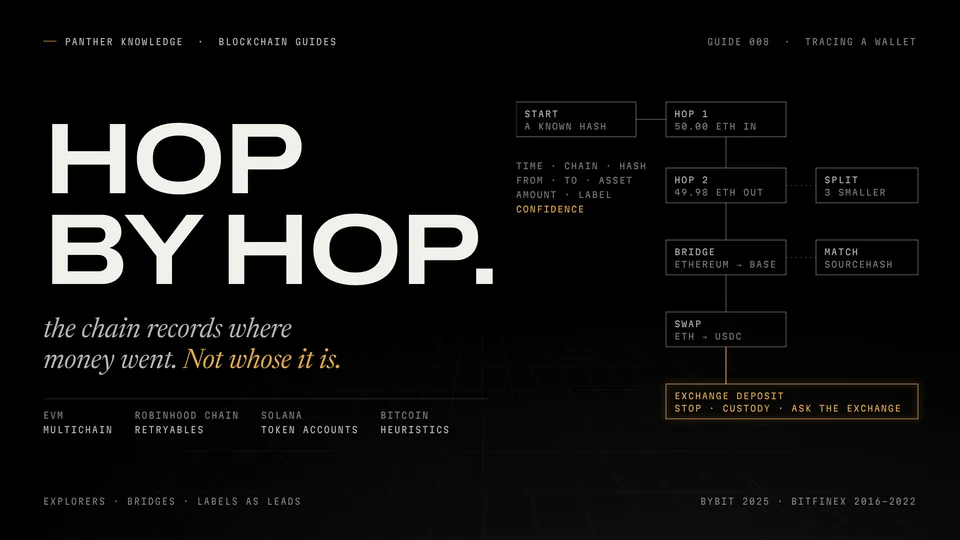
- Labels are evidence, not proof: exchange deposit addresses belong to the exchange, and contracts are not people.
- Solana uses accounts and signatures; Bitcoin uses inputs, outputs and change. Neither reads like Ethereum.
A block explorer is the one place where you can check what actually happened onchain without trusting anyone’s screenshot. A project says liquidity was added; a friend says the payment went through; a token page says the team never sold. Every one of those claims leaves a public record, and Etherscan is where most people go to read it.
The page looks dense the first time. It is not. A transaction page answers six questions in order: did it happen, when, who sent it, who received it, what moved, and what it cost. This guide walks through each field using real transactions, then the address page, the four tabs that hold the details most people miss, and how the same reading works on Base, BNB Chain, Arbitrum, Polygon and Robinhood Chain. The last section covers Solana and Bitcoin, which look similar on the surface and are built completely differently underneath.
The transaction page, field by field
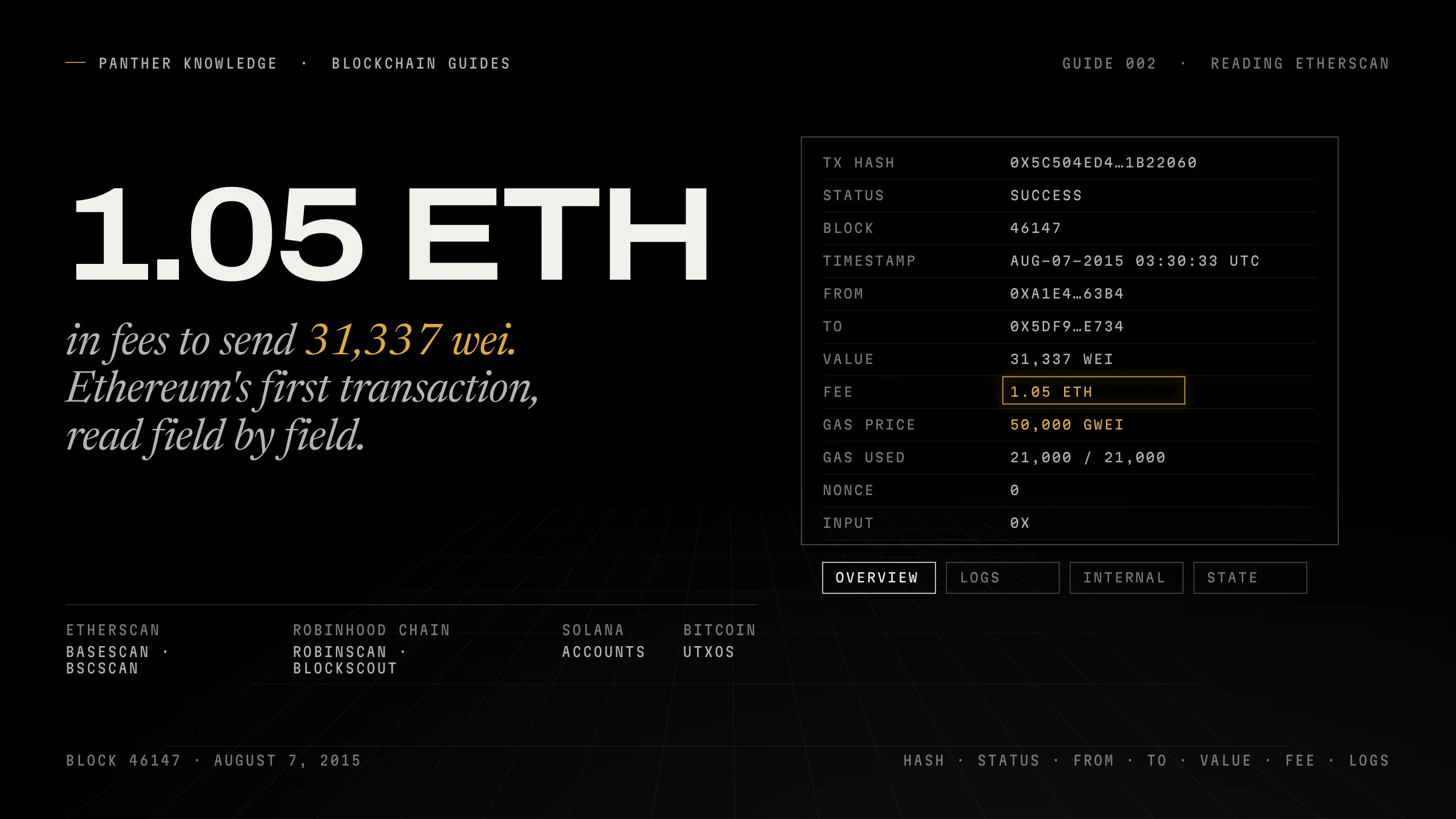
Take the first transaction ever recorded on Ethereum. It is in block 46,147, timestamped August 7, 2015 at 03:30:33 UTC, and its hash is:
0x5c504ed432cb51138bcf09aa5e8a410dd4a1e204ef84bfed1be16dfba1b22060Paste it into etherscan.io and you get the Transaction Details page. Etherscan describes that page as “widely used as a receipt between two transacting parties”, and that is the right way to read it.
| Field | What it shows in this transaction | What it means |
|---|---|---|
| Transaction Hash | 0x5c50…2060 |
The unique ID. Etherscan: “a unique identifier that is generated whenever a transaction is performed.” |
| Status | Success | Pending, Success, Failed, or Dropped/Replaced. Only Success means the state change happened. |
| Block | 46147, plus the confirmation count | The block that included it. Confirmations count the blocks built on top since. |
| Timestamp | Aug-07-2015 03:30:33 AM UTC | When the block was produced, not when the sender clicked. |
| From | 0xa1e4…63b4 (shown as thanateros.eth) |
The account that signed and paid for the transaction. |
| To | 0x5df9…e734 |
The recipient address, or the contract being called. |
| Value | 0.000000000000031337 ETH | Native ETH sent. 31,337 wei, a joke number, in a transaction that cost far more. |
| Transaction Fee | 1.05 ETH | Gas used × gas price, paid by From to the network. |
| Gas Price | 50,000 Gwei | The price per unit of gas the sender paid. |
| Gas Limit & Usage | 21,000 | 21,000 (100%) | The cap the sender set, and what was used. A plain ETH transfer always uses 21,000. |
| Nonce | 0 | This sender’s transaction counter. Zero means it was their first. |
| Input Data | 0x |
Empty: nothing was called, only ETH moved. |
The fee is the lesson. Somebody paid 1.05 ETH to send 31,337 wei, because in 2015 they set a gas price of 50,000 Gwei. The explorer does not care what you meant; it records what you signed.
Gas, in today’s terms
Since the London upgrade (EIP-1559), Etherscan splits the fee further. The base fee is “determined by the network and subsequently burned.” The priority fee is “determined by the user and is optional,” a tip to the block producer. The max fee is the most the sender agreed to pay per unit of gas. You pay base fee plus priority fee, never more than the max.
A token transfer: why “To” is not the recipient
Now a modern one. On October 8, 2026, in block 26,148,771, transaction 0xb4b08e58…ab3d moved 1,102 USDC between two wallets. Its overview says:
- To:
0xA0b86991c6218b36c1d19D4a2e9Eb0cE3606eB48. That is the USDC token contract, not the person receiving the USDC. - Value: 0 ETH. No ether moved.
- Method:
transfer. - ERC-20 Tokens Transferred: 1,102 USDC from
0xd573…f5C1to0xED9A…8771.
This is the most common misreading on any explorer. When you send a token, your wallet calls the token’s contract and tells it to update two balances. The transaction’s To field is the contract you called. The real recipient appears in the ERC-20 Tokens Transferred section and in the decoded Input Data (transfer(address to, uint256 value), with to = the recipient and value = 1102000000). USDC has six decimals, so 1,102,000,000 base units is 1,102.00 USDC. Etherscan’s API documents the same rule: divide the raw value by 10 to the power of the token’s decimals.
Input Data starts with 0xa9059cbb. That is the Method ID, which Etherscan defines as “the first 4 bytes of the Keccak-256 hash of the function signature.” Every transfer(address,uint256) on every ERC-20 begins with the same four bytes. When a contract is verified, Etherscan shows the function name in the Method column instead; when it is not, you see only the raw selector.
A swap: the transfers inside a transaction
Same block, transaction 0x9b9eb9ac…29a4. The sender called a contract (0xe6F8…728b) with method 0x8dea9fe2, which Etherscan cannot name because that contract is not verified. Inside it, two token movements:
- 120,166.55 USDC from
0x3416…27C6to the called contract. - 120,242.86 USDT from the called contract to
0x3416…27C6.
Neither token transfer comes from the person who signed the transaction. 0x3416…27C6 is a liquidity pool; the signer’s contract traded against it. If you were tracing the signer’s money, you would look at the From of the transaction, then follow which tokens left and arrived at addresses they control. If you read only the token-transfer list, you would conclude the pool sent USDC to a stranger.
That is how swaps, aggregators and bots look on every EVM explorer: one transaction from a person, many movements between contracts.
The tabs most people never open
Internal Transactions. Etherscan defines an internal transaction as “a transfer of ETH that is carried out through a smart contract as an intermediary.” They are not separate transactions; they are calls a contract made while executing yours, and they share your transaction’s hash. If a protocol paid you ETH, the payment shows here, not in your normal transaction list. The From on an internal transaction is the contract, not a person.
Logs. Etherscan: “Event logs are a mechanism for smart contracts to emit structured data during their execution.” Every ERC-20 transfer emits a Transfer event; every approval emits an Approval. The first topic (Topic0) is the hash of the event’s signature, which is how tools recognise an event without the source code. When the summary at the top looks wrong or incomplete, the Logs tab is the ground truth of what the contracts reported.
State. The storage and balance changes the transaction caused. Blockscout calls this “Storage and balance modifications.” It is where you confirm, at the level of raw balances, that what the page summarised actually changed.
Transaction Action. The line near the top that says “Swap X for Y” or “Transfer Z”. Etherscan says it “abstracts away miscellaneous information and highlights only the key events.” Useful, and an interpretation. Confirm it against the token transfers and logs before you rely on it.
The address page
Paste a wallet address and you get its balance, the USD value of its ETH, the total USD value of its token holdings, its first and last transactions, and these tabs:
| Tab | What it lists |
|---|---|
| Transactions | Every transaction this address sent or received directly |
| Internal Transactions | ETH that moved to or from it through contracts |
| Token Transfers (ERC-20) | Every ERC-20 movement in or out, including ones inside other people’s transactions |
| NFT Transfers | ERC-721 and ERC-1155 movements |
| Analytics | Balance and activity history over time |
A wallet that “never sold” may show no outgoing transactions in the first tab and plenty in Token Transfers. Check all of them.
Contract addresses get more: a Contract Creator (who deployed it), a Token Tracker if it is a token, and a Contract tab. If the source is verified, Etherscan states it “has been verified to match its on-chain bytecode.” That means you can read what the code does. It does not mean the code is safe or audited; Etherscan says so on its own guide to interacting with contracts.
Under the Contract tab, Read Contract queries the contract’s public data for free (balances, owner, fees, allowances). Write Contract sends transactions from your connected wallet, and Etherscan notes it “is always available even if the platform’s website is down.” It is also how you call a function you would rather not trust a website to build for you, like revoking a token approval. Anything you sign there is final.
Labels are evidence, not proof
Etherscan shows Public Name Tags (“Binance 14”, “Uniswap V3: Router”) and Labels (categories like Exchange or Phish/Hack). It only tags addresses that are “publicly known or shared by its owner” and, for individuals, only “when they have publicly declared their ownership.” Analytics platforms go further with machine-learned and community-submitted labels. All of it is useful, and none of it is a court record.
Three mistakes to avoid when you trace funds:
- Exchange deposit addresses belong to the exchange. Funds sent to an exchange deposit address are in the exchange’s custody; the user holds an account balance, an IOU. Past that point, only the exchange can say which user it was. Withdrawals come from the exchange’s hot wallet, not from the user.
- Contracts are not people. The From on an internal transaction or a token transfer is often a router, a pool or a bridge. Follow the transaction’s signer, not every address that touched the money.
- Pending is not mined. Explorers and APIs list pending transactions with no block number. A transaction that appears in a list has not necessarily happened; check that Status is Success and a block is shown.
Same layout on other EVM chains
Etherscan builds explorers for other networks under its Explorer-as-a-Service programme, and they share its layout, tabs and tools:
| Network | Explorer | Note |
|---|---|---|
| Base | basescan.org | “Built by Team Etherscan” |
| BNB Chain | bscscan.com | Listed among Etherscan’s explorers |
| Arbitrum One | arbiscan.io | “Built by Team Etherscan” |
| Polygon PoS | polygonscan.com | Listed among Etherscan’s explorers |
| Robinhood Chain (chain ID 4663) | robin.etherscan.io (RobinScan) and robinhoodchain.blockscout.com | RobinScan is built by Team Etherscan; Blockscout describes itself as the chain’s official explorer |
Everything above reads the same on these sites. One trap: a transaction hash only exists on the chain where it was sent. A Base hash pasted into Etherscan returns nothing, not an error that tells you why. Etherscan’s address page has a Multichain button that shows which other chains an address has activity on.
Blockscout is the other major EVM explorer, open source and used by many chains, including as Robinhood Chain’s official explorer. Its transaction page has the same fields (hash, status, block, from, to, value, fee, gas price, gas limit, gas used, nonce, input) and the same tabs, named Token transfers, Internal txns, Logs, State and Raw trace, the last being the full execution trace. On Blockscout, as on Etherscan, a contract can only be read or written once its source is verified.
Solana is not an EVM chain
Solana explorers (Solscan, Solana Explorer) look familiar and are built on a different model.
- Everything is an account. Solana’s docs: “An account is Solana’s fundamental data unit for storing state.” Token balances live in separate token accounts owned by your wallet, not in a balance column inside the token contract.
- The transaction ID is a signature. “The first signature in a transaction… can be used to uniquely identify the transaction.” Solscan labels it Signature, not hash.
- Fees are in lamports. One lamport is 0.000000001 SOL. The base fee is 5,000 lamports per signature, half burned and half paid to the validator, plus an optional priority fee.
- Programs, instructions, logs. A transaction holds one or more instructions, each calling a program. Solscan shows the instructions and a Program Logs section, the closest equivalent to EVM event logs.
- Atomic, and you still pay. All instructions succeed or none do, and the fee is charged on failure.
Reading a Solana transfer means finding which token accounts changed, then which wallets own them.
Bitcoin has no balances onchain
Bitcoin explorers (mempool.space and others) show inputs and outputs, not senders and receivers. Each transaction spends previous outputs and creates new ones; an output waits as an unspent transaction output (UTXO) until a later transaction spends it. A wallet’s “balance” is the sum of the UTXOs its keys can spend.
Because an input must be spent in full, most payments create a change output back to the sender, and Bitcoin’s developer guide recommends sending change to a new address. So a two-output transaction usually means “payment plus change”, and you cannot always tell which is which. Fees are set by size (sat/vB). Bitcoin’s developer documentation suggests waiting for at least six confirmations before treating a high-value payment as settled.
A five-minute checklist for any transaction
| Question | Where to look |
|---|---|
| Did it happen? | Status = Success, with a block number |
| Who actually acted? | Transaction From (the signer), not token-transfer From |
| What moved? | Value for native coin; Token Transfers and Logs for tokens; Internal Transactions for ETH through contracts |
| What did it call? | To, Method, and the decoded Input Data; is the contract verified? |
| What did it cost? | Transaction Fee, Gas Price, Gas Used |
| Is the label real? | Tag source link; treat analytics labels as hypotheses |
| Right chain? | The explorer matches the network the transaction was sent on |
Sources
- 01What is a transaction hash (TxHash)? · Etherscankb.etherscan.com/what-is-a-transaction-hash-txhash
- 02Viewing transactions on Etherscan · Etherscaninfo.etherscan.com/viewing-transactions-on-etherscan
- 03Understanding an Ethereum transaction · Etherscaninfo.etherscan.com/understanding-an-ethereum-transaction/
- 04What is gas fee? · Etherscaninfo.etherscan.com/what-is-gas-fee
- 05What is Method ID? · Etherscaninfo.etherscan.com/what-is-method-id
- 06What is event logs? · Etherscaninfo.etherscan.com/what-is-event-logs
- 07Transaction Action · Etherscaninfo.etherscan.com/transaction-action
- 08Exploring an EOA address · Etherscaninfo.etherscan.com/explore-eoa-address
- 09Exploring a contract address · Etherscaninfo.etherscan.com/explore-contract-address/
- 10How to safely interact with smart contracts on the explorer · Etherscaninfo.etherscan.com/how-to-safely-interact-with-smart-contracts-on-the-explorer
- 11Read and Write Contract features · Etherscaninfo.etherscan.com/how-to-use-read-or-write-contract-features-on-etherscan
- 12Public name tags and labels · Etherscaninfo.etherscan.com/public-name-tags-labels
- 13Token transfers API (decimals) · Etherscan Docsdocs.etherscan.io/api-reference/endpoint/tokentx
- 14Explorers built by Etherscan · Etherscanetherscan.io/explorer-as-a-service-eaas
- 15Transaction 0x5c504ed4…1b22060 (block 46147) · Etherscanetherscan.io/tx/0x5c504ed432cb51138bcf09aa5e8a410dd4a1e204ef84bfed1be16dfba1b22060
- 16Transaction 0xb4b08e58…7673a7ab3d (USDC transfer) · Etherscanetherscan.io/tx/0xb4b08e58ca71117ffe7da1ea95217e1055cd3b1e1af65f598339c97673a7ab3d
- 17Transaction 0x9b9eb9ac…bad50429a4 (USDC/USDT swap) · Etherscanetherscan.io/tx/0x9b9eb9ac829bc8ff9ef55cea53f7c1a3022b0bd2cd6ed6c0b45800bad50429a4
- 18Transaction fields · Blockscout Docsdocs.blockscout.com/using-blockscout/overviews/transaction-fields
- 19Robinhood Chain on Blockscout · Blockscout Docsdocs.blockscout.com/robinhood-api
- 20Accounts · Solana Docssolana.com/docs/core/accounts
- 21Transaction structure · Solana Docssolana.com/docs/core/transactions/transaction-structure
- 22Fees · Solana Docssolana.com/docs/core/fees
- 23Transactions (UTXO, change) · Bitcoin Developer Guidedeveloper.bitcoin.org/devguide/transactions.html
- 24Payment processing (confirmations) · Bitcoin Developer Guidedeveloper.bitcoin.org/devguide/payment_processing.html
- 25What's in my wallet? (exchange deposit addresses) · ACAMS Todaywww.acams.org/en/opinion/whats-in-my-wallet
Responses
No responses yet. Start the conversation.
Panther Journal — The intelligence brief
Stay ahead of the story.
Free. New investigations delivered when published. Unsubscribe anytime.